Duda is now serving WebP images for all site images, which means your site images load more quickly. This change automatically boosts site performance and requires no additional effort at your end. We take care of everything, automatically and behind the scenes.


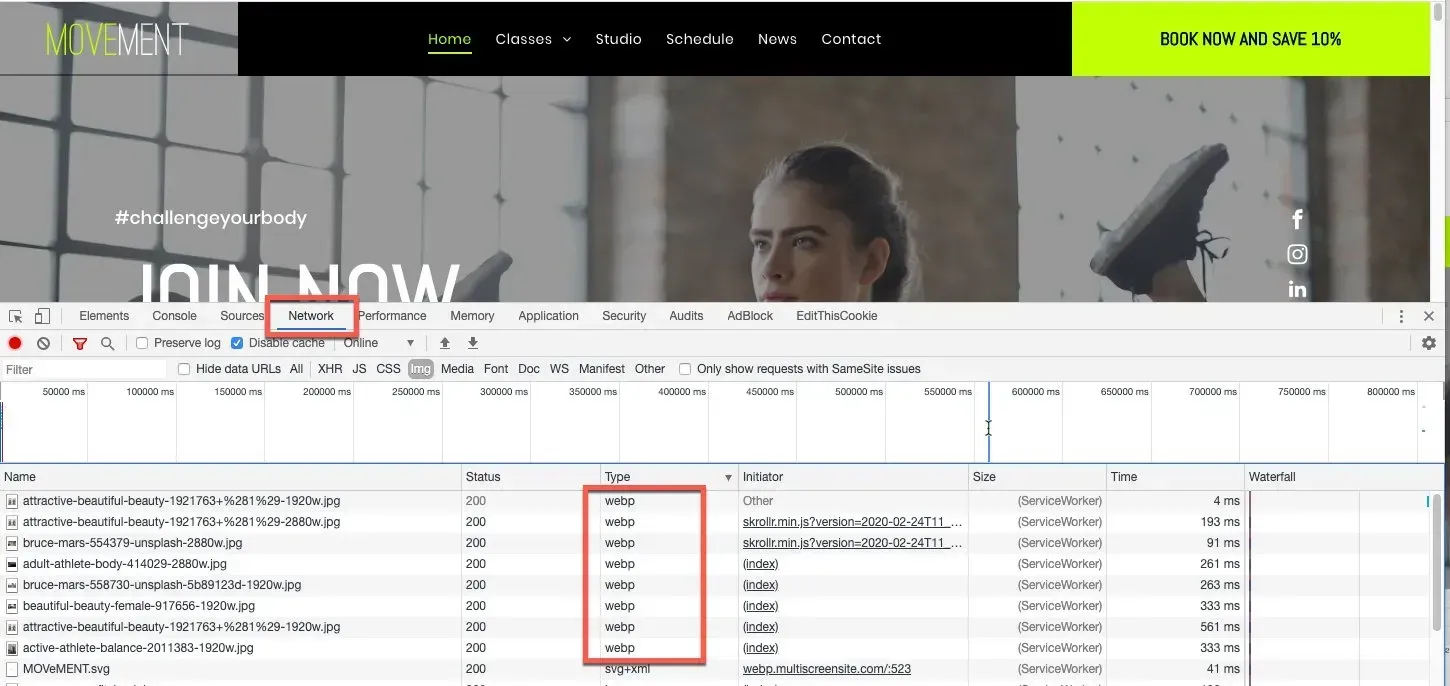
To check whether the images were served as WebP visit the Network tab and check the image type - see below.

Why WebP is great for your sites


WebP is an image format developed by Google that provides lossless and lossy compression for images on the web. Using this format, images are smaller and richer than in other formats, which enables them to load more quickly. For example, WebP lossless images are 26% smaller than PNGs and 25-34% smaller than JPEG images. See this article on Google's developer site for more details.


One more way we’re optimizing your images


In addition to converting JPEG and PNG files to WebP, we’re also adjusting the size of images so that they automatically fit their containers. It’s another effort we’re making, behind the scenes, so your sites load quickly and rank well on Lighthouse.


WebP images already in all new Duda sites


In every new site you build, images will now be in WebP format. For all existing sites, simply republish the site and the images will be automatically converted.


Note:

  • The change doesn't affect the image name
  • SVGs and Gifs are not converted to WebP
  • Safari doesn’t support WebP, so when your sites are delivered on this browser, images will be displayed in their original format.
February 27, 2020
Roni Landau

 • 

WebP images on all Duda sites for faster loading

Stay in the Loop with Duda Updates

Sign up to get feature releases, tools, and more to your inbox.

Latest product updates

Contact form editor with “Manage form” settings menu and “Hidden Fields” selected over a pink-purple background
By Yanir Moskovitz July 27, 2026
Automatically capture valuable visitor metadata in form submissions to help to better track and target your audience.
Blank white chat interface with “Ask anything” prompt and a “Build” dropdown at the bottom.
By Tal Levi July 22, 2026
Go beyond websites and create custom digital experiences through conversation.
Web app dashboard showing a “Collection1” page with a sidebar, table, and open action menu
By Mor Zamir July 20, 2026
A collection (no pun intended) of updates to simplify the way you build dynamic pages and work with larger datasets.