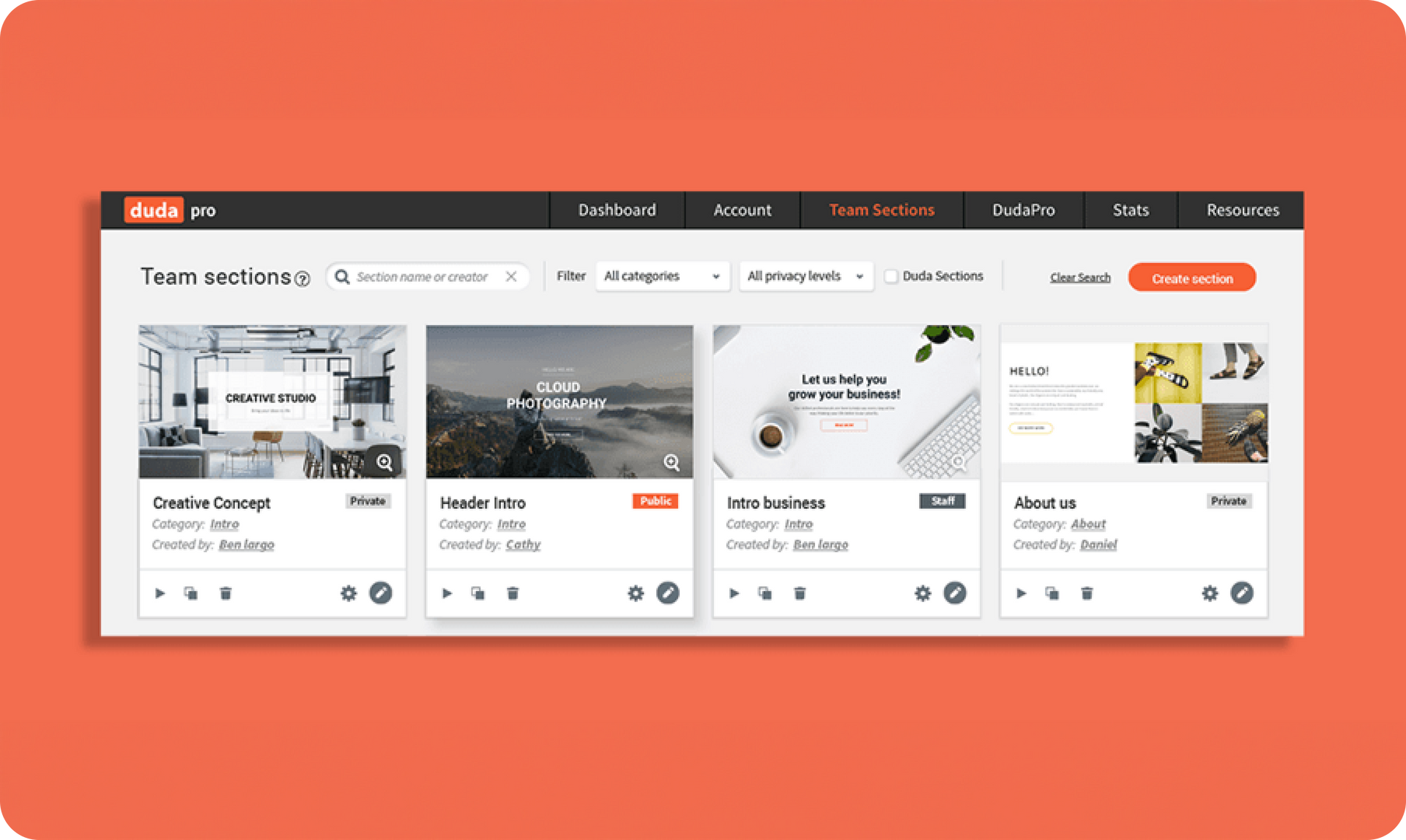
The new Team Section Dashboard is an exciting new collaborative space where you and your teammates can come to be inspired. You can see all of the Sections built by you and your team here, as well as those designed by Duda.


This new dashboard provides a space for sharing resources, making it easier to increase your site-building speed and build amazing websites at scale for your customers.


Optimize teamwork


The Team Section Dashboard enables your entire team to be more efficient. You’ll see all available Sections at a glance, which means you won’t spend time building Sections that you already have. Just make sure that you set your Section visibility level to Staff, so everyone on your team can see your Sections.


Save time


The Dashboard’s Search feature enables you to search predesigned Duda Sections, as well as Sections that you and your teammates have built. You can search by Section name or creator, or filter according to Category and Privacy level.

You can also create new Sections or edit existing Sections. This means you don’t have to open a Section inside a website in order to edit the design or settings.


Duplication: The best form of flattery


Duplication is a terrific form of flattery, and a great time-saver, too. See a Section that you love and want to change it just a little bit? Simply click the Duplicate button and use it as the starting point for building a new Section.


Getting started


The Team Sections Dashboard is just one more tool to support your team collaboration and allow you to be more efficient.To try it out, just click the Team Section tab in the main Duda dashboard. If you or anyone on your team has already created a Team Section, you’ll automatically see it here. If not, click Create your first section and start building.


February 18, 2018
Roni Landau

 • 

Introducing: Team Sections Dashboard

Stay in the Loop with Duda Updates

Sign up to get feature releases, tools, and more to your inbox.

Latest product updates

Google Lighthouse score card showing SEO 98 and Best Practices 97 on a white panel over a landscape background
By Tal Levi • October 9, 2026
A stronger foundation for every new Vibe project, with faster load times, better performance, and built-in SEO.
Accessibility app menu overlay on a photo background with a woman in sunglasses
By Ofri Baram • October 5, 2026
More updates for you that make Copilot a more integrated part of building and managing sites in Duda.
Interior scene with potted tree by a window and a dark sidebar menu on the right.
By Avigayil Lewin • October 2, 2026
Create and work on Vibe projects directly from Claude, ChatGPT, or any other AI assistant that supports MCP.