Building product grids, service or event listings? The new Dynamic Repeater (beta) in Editor 2.0 lets you design once and auto-populate cards from your collection data. No more copying, pasting, or manually syncing changes, just faster, cleaner layouts that scale with your content.

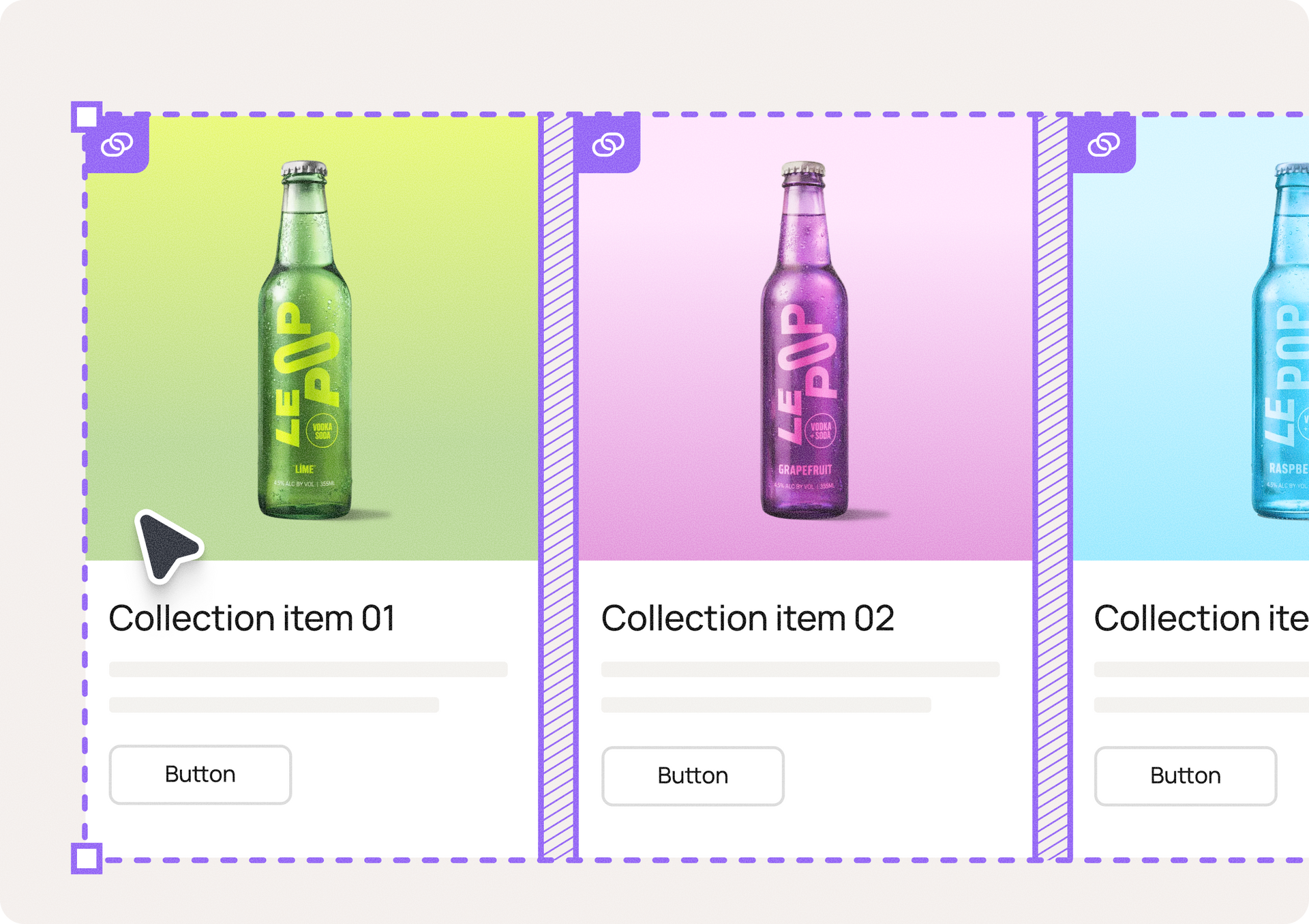
The Dynamic Repeater is a collection-powered layout tool. You design a single card template, and it generates as many copies as you need, with each item pulling unique content from a different collection row. Update the design once, and every card updates instantly. Change a font, add a widget, or adjust spacing, and it syncs everywhere automatically.

How it works

Drop a Dynamic Repeater onto your canvas, and it creates a collection automatically. Each card connects to one row of data and comes with a default setup:

  • Image
  • Title
  • Body text
  • Button


Customize these freely and link them to any collection fields you want. To update the content, just edit the collection. Add a row, and a new card appears. Change a field, and it updates across your site.

Built to engage, easy to scale

Whether you're showing just a few or many items, the Dynamic Repeater handles it with ease. Use this tool to showcase most kinds of list items, like:

  • Service offerings – Consistent service cards
  • Event listings – Dates, images, registration links
  • Team pages – Staff bios with photos
  • Location directories – Multiple offices or properties

In addition, you can use the Dynamic Repeater as a new and improved way to display Dynamic Pages within the site - if you've used Dynamic Pages before, this will feel familiar. It's the same data-driven approach, now available for flexible layouts.

Getting Started

Find it in Editor 2.0 > Widgets > Layout Elements. Drag it onto the canvas, style your template, and populate the collection.


A few notes

The Dynamic Repeater is still in betaThis means we're still refining it and working to make it the best it can be.


Switching collections: If you connect to a different collection, you'll need to manually relink each card element to the new data.

Using widgets: Widgets that support collection data must be manually connected. Widgets that don't, will appear as static visuals across all cards.

Availability: The Dynamic Repeater is available with the Agency account plan and up.


To learn more about the Dynamic Repeater, how to set it up with a new collection or how to add widgets to it,
consult this handy support guide.


The Dynamic Repeater brings collection power into your design workflow, making it easier to build flexible, scalable layouts without sacrificing speed or control.


We can't wait to see what you build with it.


February 11, 2026
Yanir Moskovitz

 • 

Goodbye Repetitive Design, Hello Dynamic Repeater

Stay in the Loop with Duda Updates

Sign up to get feature releases, tools, and more to your inbox.

Latest product updates

Form with fields to fill out and
By Annat Katz February 2, 2026
Multi-file upload in the Advanced Form, 2-trigger animations, meta tags import with Copilot and more.
Two cards with photos and text, interface showing
By Liron Hilb Horev January 15, 2026
Break down a form into separate pages to drive more completions and offer a better experience overall.
A purple rectangle with the text
By Annat Katz January 1, 2026
The AI revolution changed everything. In 2025, Duda helped you stay on top of it with updates that transform how you build, manage, and compete.