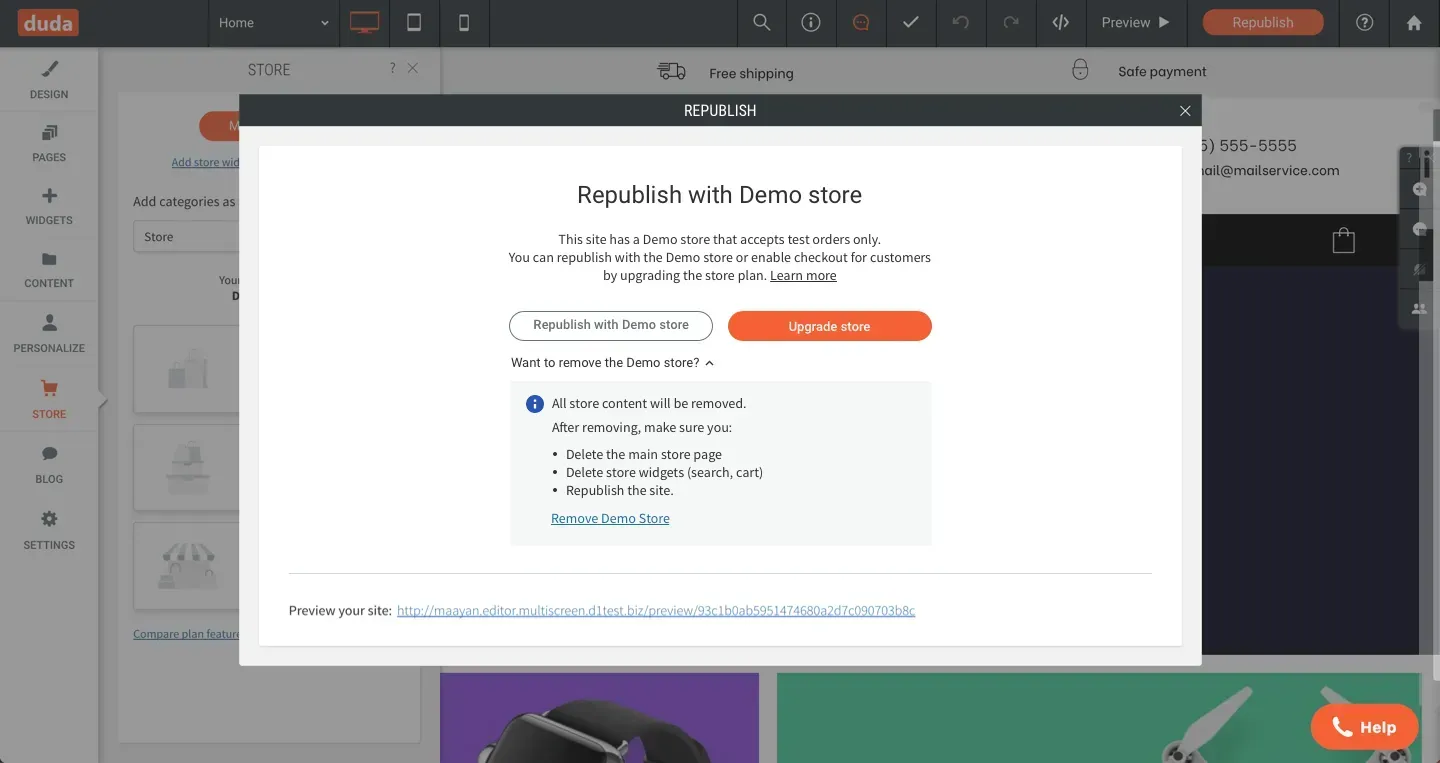
You can now remove Demo stores from published sites, easily, quickly and without contacting support. This saves you time and puts you in control of your site stores.

When you remove the Demo Store, the main store widget is automatically removed from the site. Manually, remove the store page, as well as store-related widgets such as cart and search. Republish the site to make the changes live.


Want to add a store to the site in the future? No problem. Just click Store in the left side panel and a new store will be added to your site, with the default store content.

 Removing demo stores in a click means:


  • If you like the design of an online store template, you can choose it for a site without ecommerce, and simply remove the store.


  • If you add a demo store to your site as part of your pitch to your client and they don’t want it, it’s simple and quick to remove.
May 13, 2020
Roni Landau

 • 

Remove Demo Store

Stay in the Loop with Duda Updates

Sign up to get feature releases, tools, and more to your inbox.

Últimas atualizações de produtos

Two cards with photos and text, interface showing
Por Liron Hilb Horev January 15, 2026
Break down a form into separate pages to drive more completions and offer a better experience overall.
A purple rectangle with the text
Por Annat Katz January 1, 2026
The AI revolution changed everything. In 2025, Duda helped you stay on top of it with updates that transform how you build, manage, and compete.
Woman smiles, a form opens with
Por Annat Katz December 15, 2025
ChatGPT joins Duda's MCP, date picker and Zapier integrations added to Advanced Forms, plus more updates.