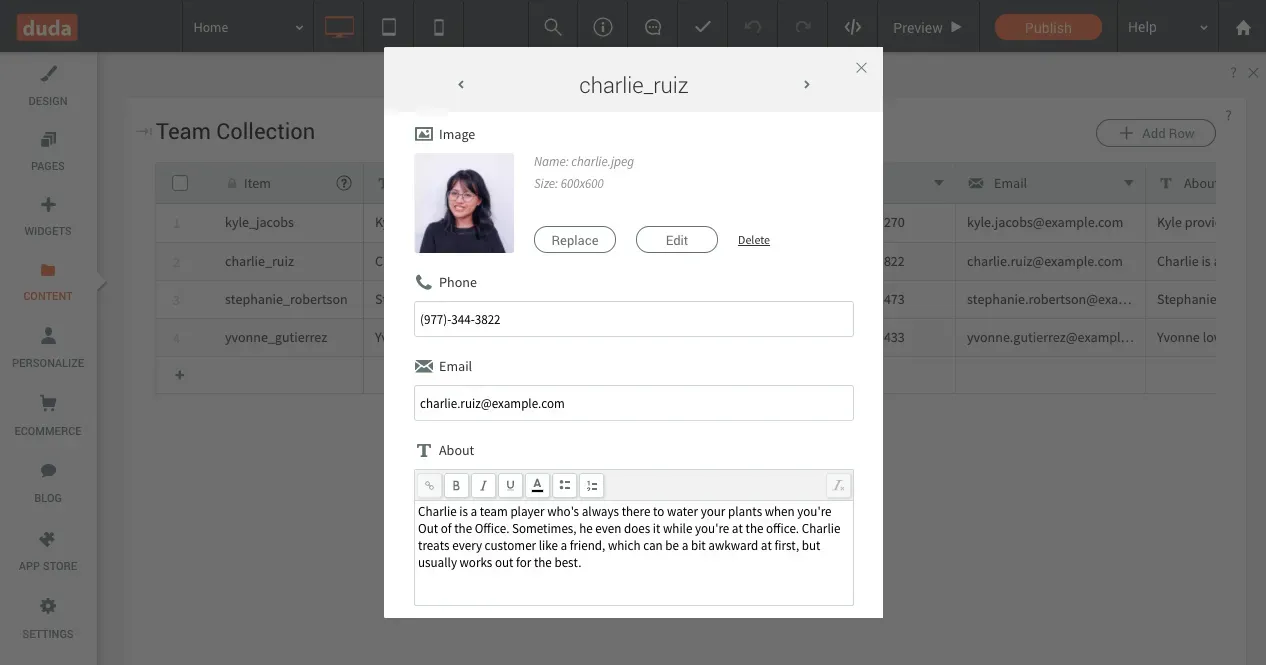
Adding, editing and viewing Internal Collections data just got easier, since you can now open each row in its own window. This enables you to see all the row content, which represents a page on your site when using Dynamic Pages, in a single, compact space . 

Add Row - Add Content for an Entire Page Item 


Open an Internal Collection and click the Add Row button in the top right corner to open a new window, set with the collection’s existing fields. Fill in the fields, and you’ve got a new row, corresponding to a new page item in your site. 


Edit Row - Update Content in Context 


Hover a row in the collection and click the expand icon on the left, or right-click anywhere on the row, and click Edit Row. Content for the entire row opens in a new window, for quick and easy editing in context. 


Give it a try now in any Internal Collection. 

July 22, 2020
Roni Landau

 • 

Internal Collections: Easier Editing

Stay in the Loop with Duda Updates

Sign up to get feature releases, tools, and more to your inbox.

Últimas atualizações de produtos

Two cards with photos and text, interface showing
Por Liron Hilb Horev January 15, 2026
Break down a form into separate pages to drive more completions and offer a better experience overall.
A purple rectangle with the text
Por Annat Katz January 1, 2026
The AI revolution changed everything. In 2025, Duda helped you stay on top of it with updates that transform how you build, manage, and compete.
Woman smiles, a form opens with
Por Annat Katz December 15, 2025
ChatGPT joins Duda's MCP, date picker and Zapier integrations added to Advanced Forms, plus more updates.