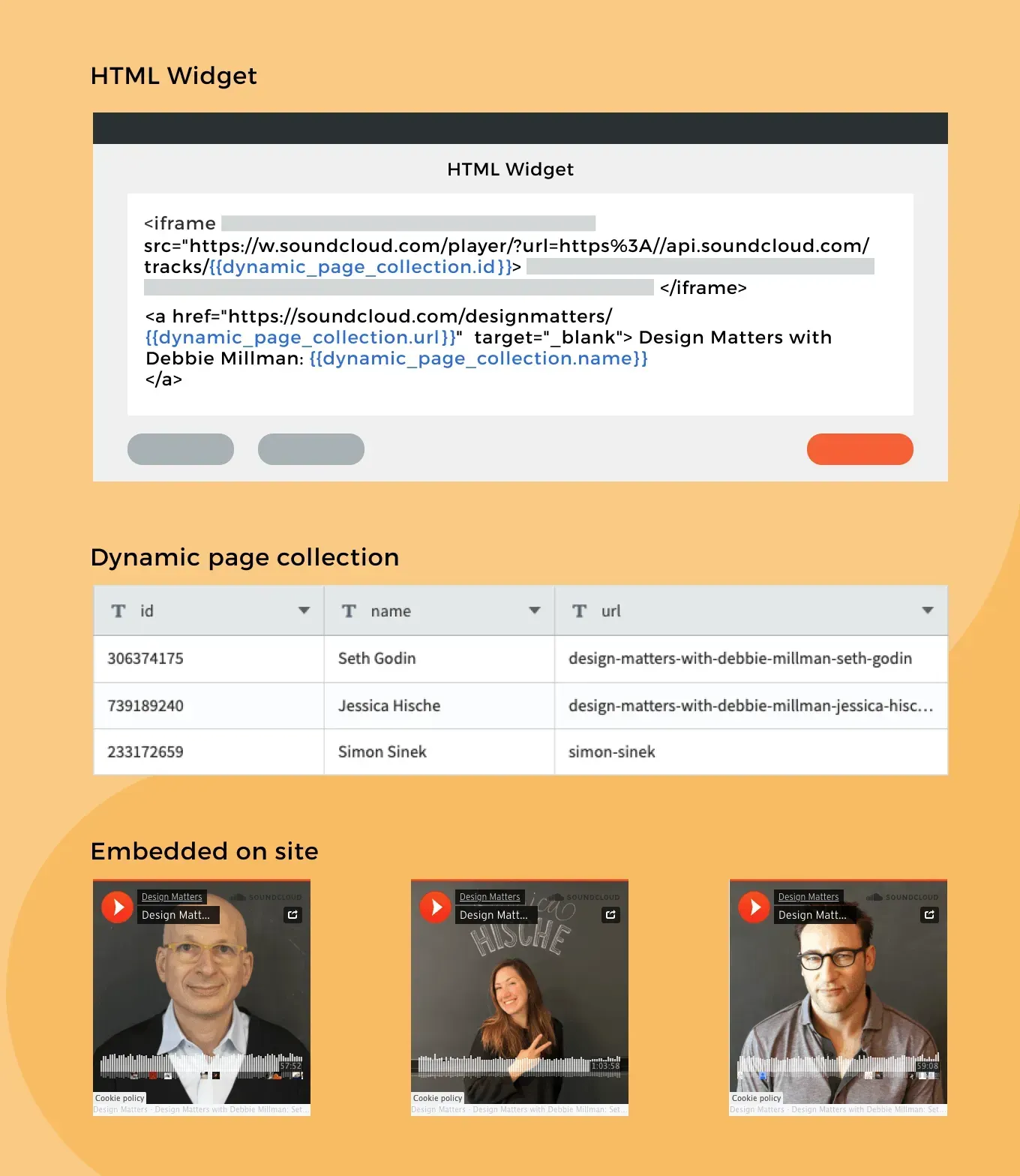
The newest Connected Data addition is the HTML widget. It enables you to add connected data elements to your HTML widget, and use the HTML widget in your dynamic pages.

How to Use This in Dynamic Pages


The HTML widget allows you to add customized code to your site. With this new addition, you can combine connected data elements in it.


For example, if you want to embed an element in your Dynamic Page – a podcast from SoundCloud, an external calendar or any customized code – and you want it to be different in each dynamic page, you can store the ID in your collection and embed the code in the HTML widget. In the widget itself, click ‘Connect’, select the ID field, and paste it in the relevant place.


Use Case: Add a Podcast to Every Dynamic Page 


If we take the podcast “Design Matters’ and embed it in our site, we’ll notice 3 differences between the embedded codes: track ID, URL slug [the end of the URL] and guest name. If we store these 3 elements in the collection, we can embed the code once, and connect it.


For more about the HTML widget, see this.

For more about Connected Data, see this.


November 23, 2021
Inbar Amir

 • 

Connected Data: Now in the HTML Widget

Stay in the Loop with Duda Updates

Sign up to get feature releases, tools, and more to your inbox.

Últimas atualizações de produtos

A purple rectangle with the text
Por Annat Katz January 1, 2026
The AI revolution changed everything. In 2025, Duda helped you stay on top of it with updates that transform how you build, manage, and compete.
Woman smiles, a form opens with
Por Annat Katz December 15, 2025
ChatGPT joins Duda's MCP, date picker and Zapier integrations added to Advanced Forms, plus more updates.
Website with a Copilot panel. Panel requests adding user@website.com to site and sharing a preview link.
By Idan Sapir December 12, 2025
Discover a single, seamless experience where you can simply chat to get things done in your account and sites.